
USB Hub Switch with 4 or 7 Ports for Laptop Computer Mouse Keyboard and Peripherals, Compact USB 2.0 Multi-Port Splitter in Black or White Colour, Desktop Sharing Hub Without External Power Supply


USB Hub Switch with 4 or 7 Ports for Laptop Computer Mouse Keyboard and Peripherals, Compact USB 2.0 Multi-Port Splitter in Black or White Colour, Desktop Sharing Hub Without External Power Supply
USB Hub Switch with 4 or 7 Ports for Laptop and Desktop Computer Peripherals

This USB hub switch provides a straightforward solution for expanding the connectivity of your computer. Many modern laptops and compact desktops have a limited number of USB ports, which can be frustrating when you need to connect a mouse, keyboard, external storage, and other accessories simultaneously. This hub effectively multiplies a single USB port into four or seven usable ports, depending on the model you select. It operates without needing a separate power adapter, making it a simple and portable addition to any workstation. Available in black and white, it can blend with various office or home desk aesthetics. The USB 2.0 specification ensures compatibility with a wide range of common peripherals.
Features and Construction

The hub's primary function is to expand connectivity, and it does so with a choice of two port configurations. Its construction is focused on practicality for everyday use with common computer accessories.
Material and Build
While specific materials are not detailed, the hub features a plastic housing typical of such devices, which keeps it lightweight. It contains the necessary circuitry to manage multiple USB connections from a single host port. The build is centred on providing reliable connectivity for standard peripherals like input devices and flash drives, without the complexity of an external power brick. This makes the setup clean and reduces cable clutter on your desk.
Size and Practical Fit
No exact dimensions are provided, but the design is described as compact. This suggests it will occupy minimal space on your desk, easily fitting beside a laptop or monitor. The lack of an external power supply further contributes to a tidy workspace. The hub is a practical fit for users who need to connect several low-to-moderate power USB devices without dedicating a power outlet to the hub itself.
Uses and Placement

The hub is designed for scenarios where additional USB ports are required, whether for personal computing tasks or shared workstation environments. Its applications are tied directly to its port expansion capability.
Event or Professional Use
In professional settings or at events, this hub can facilitate desktop sharing. For example, during a presentation, multiple devices like a presentation clicker, a wireless keyboard, and a USB drive could be connected through the hub to a single laptop port. Its simple operation means it can be used quickly by different people without technical setup. The choice between four or seven ports allows you to select a model that matches the number of devices typically needed for the task.
Everyday Home Use
At home, the hub solves the common issue of running out of USB ports on a computer. It allows a family to keep a mouse, keyboard, webcam, and printer dongle permanently connected. The plug-and-play nature means it can be easily moved between different computers if needed. Selecting the black or white colour option lets it coordinate with your existing computer hardware and desk furniture for a cohesive look.
Benefits and Buying Value
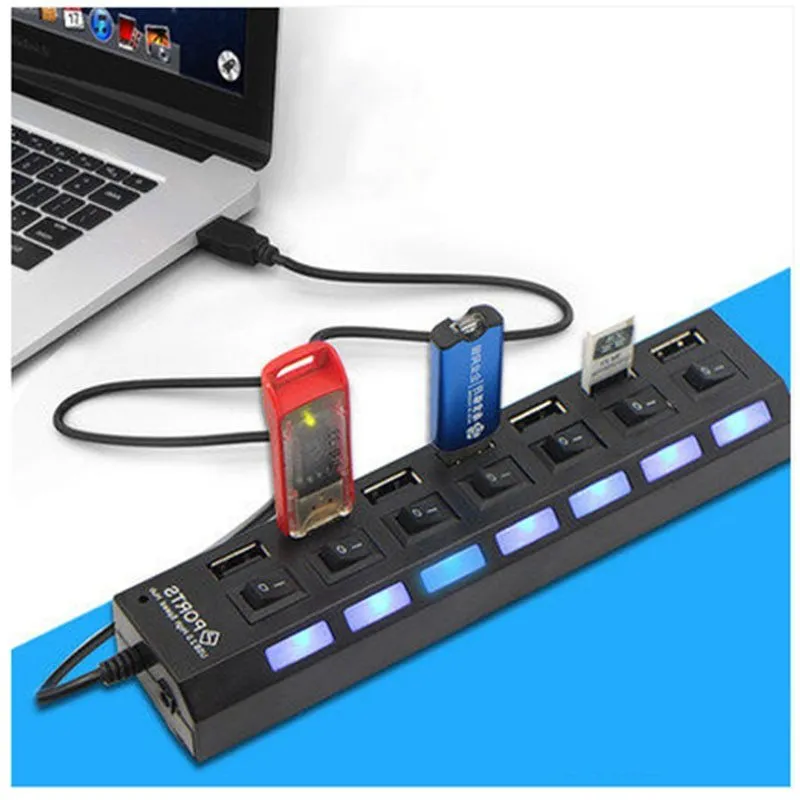
The value of this product lies in its specific function of adding USB ports in a simple, reliable manner. It addresses a clear connectivity gap without introducing unnecessary features or cost.
Reuse and Low Maintenance
As a basic connectivity tool, the hub requires virtually no maintenance. It has no moving parts or software to install. Its reuse potential is high; it can be repurposed for different computers or setups over time as your needs change. The durable nature of such hubs means it can serve as a long-term solution for port expansion.
Why Choose This Product
This hub is a suitable choice if you need to connect several standard USB peripherals and prefer a solution without an external power adapter. The key decision points are the number of ports (4 or 7) and the colour (black or white). It provides a focused answer to the problem of insufficient USB ports, without the extra cost or complexity of features like high-speed data transfer or charging ports that you may not require.

